
eCommerce teams deal with data from everywhere. Orders sit in Shopify, ad costs come from Meta and Google, email results live in Klaviyo, product numbers flow from Amazon and more. The problem is that none of these sources connect smoothly. Because of this, many brands feel like they are guessing when trying to understand LTV, repeat purchases, margins, or which channels actually drive profitable growth.
This is where eCommerce analytics software makes a real difference. Instead of jumping between dashboards, it pulls everything into one place and gives a clear view of what is working, what is slipping, and where the next opportunity is. Recent studies support this. Shopify reports that returning customers contribute a much higher share of revenue, and McKinsey notes that companies using strong analytics make faster decisions and grow more consistently.
The real issue is not the lack of data. It is the lack of connected insights. Modern eCommerce analytics tools like Saras Analytics solve this by unifying customer and order data, highlighting trends, and using AI to flag churn risks or forecast revenue more accurately.
What Is eCommerce Analytics Software?
eCommerce analytics software pulls data from Shopify, Amazon, Meta Ads, Klaviyo, GA4, and other platforms into one system so teams can see what drives revenue, retention, and profitability. Instead of checking separate dashboards or stitching spreadsheets, you get a unified view of customers, products, channels, and orders.
Modern tools use AI to predict churn, forecast LTV, highlight unusual shifts, and reveal patterns that are hard to spot manually. They also apply consistent modeling across channels, providing teams with reliable numbers for planning and decision-making.
Most eCommerce brands eventually outgrow GA4 because it only tracks web behavior. eCommerce analytics software fills that gap by combining acquisition data, customer journeys, fulfillment performance, and product-level metrics in a single place.
Who Should Use eCommerce Analytics Software?
Different teams across an eCommerce business use analytics for very different decisions. When everyone works from scattered data, those decisions become slow and inconsistent. eCommerce analytics software solves this by giving each team a clear view of the numbers they rely on.
Here’s how it supports every function:
| Who | Why They Need It | What They Achieve |
|---|---|---|
| Marketing & Growth Teams | To see which channels, campaigns, and audiences drive profitable customers | Better budget allocation, higher ROAS, improved LTV-positive acquisition |
| Retention & CRM Teams | To identify churn risk, segment customers, and measure email/SMS performance | Stronger repeat purchase rate, targeted flows, improved lifecycle journeys |
| Merchandising & Product Teams | To understand SKU performance, bundles, replenishment cycles, and product affinities | More innovative inventory planning, personalized bundles, data-backed product decisions |
| Operations Teams | To track fulfillment issues, delivery delays, and operational bottlenecks | Fewer cancellations, smoother operations, better customer experience |
| Finance & Revenue Teams | To get accurate margins, contribution profit, and forecasting inputs | Clear profitability insights, realistic forecasts, and stronger cash flow planning |
| Founders & eCommerce Leaders | To unify data scattered across Shopify, GA4, Amazon, ads, and CRM platforms | A single view of business health, faster decision-making, and less guesswork |
Top 10 eCommerce Analytics Software in 2026
With so many tools claiming to offer “complete visibility,” it’s hard for eCommerce teams to know which platforms actually deliver meaningful insights.
Below is a quick overview of the top eCommerce analytics software in 2026, based on data coverage, eCommerce depth, and how well each tool supports real-world decision-making for DTC and omnichannel teams.
| Software | Best For |
|---|---|
| Saras iQ | eCommerce retention, LTV, cohorts, unified analytics |
| GA4 | Web & app behavior tracking |
| Glew | SMB eCommerce reporting across channels |
| Adobe Analytics | Enterprise digital analytics & customization |
| Matomo | Privacy-focused web analytics |
| Woopra | Customer journey analysis |
| Mixpanel | Product & event-level analytics |
| Supermetrics | Moving marketing data into BI tools |
| Optimizely | Experimentation & A/B testing insights |
| TripleWhale | Shopify-first DTC analytics & attribution |
10 Best eCommerce Analytics Software in 2026 (Comparison Table)
A deeper comparison across the factors eCommerce brands care about: connectors, KPIs, profitability, attribution, operational visibility, and product analytics depth.
| Tool | Data Connectors & Freshness | Dashboarding & BI | eCommerce KPIs | Profitability Analytics | Attribution | Operational Metrics | Product Analytics |
|---|---|---|---|---|---|---|---|
| Saras iQ | 200+ connectors via Daton; daily refresh; unified customer + order data | Advanced no-code dashboards, automated reports, cohorts | Deep KPIs: LTV, CAC, ROAS, AOV, retention, repeat rate | SKU margins, COGS, contribution margin, real-time profitability | Cross-channel attribution (Amazon, Meta, Google) | Inventory, fulfillment, channels, marketplace ops | Product performance, velocity, variants, repeat rate |
| GA4 | Web/app only; near real-time events | Flexible dashboards, not BI-grade | Basic eCommerce revenue & funnel metrics | None | Modeled attribution | Limited to on-site behavior | Basic event interactions |
| Glew | Good eCommerce connectors; daily refresh | Prebuilt eCommerce dashboards | Strong SMB KPIs (sales, ROAS, multichannel) | Basic margin & COGS | Basic marketing attribution | Inventory snapshots, store metrics | SKU performance, sales mix |
| Adobe Analytics | Enterprise integrations: warehouses, CRM, apps | Enterprise-grade BI | Strong when custom-configured | Advanced profitability (custom) | Multi-touch attribution | Requires setup | Journey & product interaction |
| Matomo | Limited connectors; manual imports | Simple dashboards | Basic eCommerce KPIs | None | Basic referral attribution | Minimal | Basic impressions & clicks |
| Woopra | SaaS + CRM connectors | Journey dashboards only | Limited eCommerce KPIs | None | Journey-based attribution | Minimal | Behavioral product paths |
| Mixpanel | Event connectors | Exceptional event dashboards | Weak eCommerce KPIs | None | No eCommerce attribution | No ops metrics | Strong product analytics |
| Supermetrics | 100+ connectors; freshness varies | None (BI destination only) | None | None | None | None | None |
| Optimizely | Experiment connectors | Experiment dashboards | None | None | Experiment lift attribution | None | None |
| TripleWhale | Shopify + ad channels; real-time pixel | Solid DTC dashboards | Strong DTC KPIs (MER, ROAS, blended) | Basic profitability | Strong DTC attribution | Minimal | Shopify product analytics |
1. Saras iQ
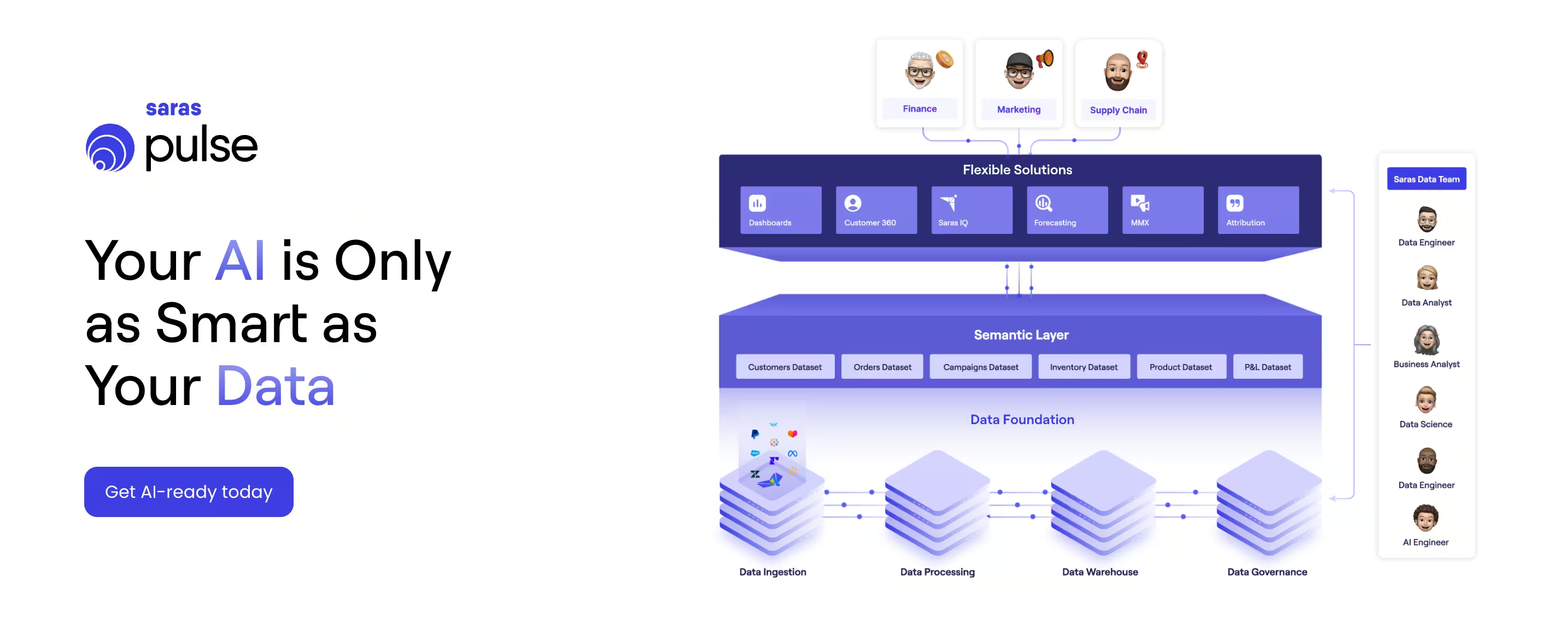
Saras iQ is a turn-key reporting and intelligence layer built for eCommerce and omnichannel brands. Sitting atop Saras Daton’s unified data pipelines, it converts disconnected sales, marketing, operations, and finance data into AI-ready datasets and dashboards for a single business view.
Compared to generic BI tools or lightweight dashboard apps, Saras iQ combines e-commerce-native models with a dedicated data team.
It is built for brands that are beyond “spreadsheet reporting” and want to improve customer retention, forecast growth with ~95% accuracy, and turn their data into a high-ROI channel rather than a cost center.
Key Features
- Customer 360 & advanced cohorts that map CLTV across segments, channels, and products
- Cohort and retention dashboards to monitor the impact of initiatives on churn and repeat purchases in real time
- Churned high-value customer tracking to identify recently lost customers and trigger targeted win-back outreach
- Omnichannel sales visibility across Shopify, Amazon, and other channels in one view, including SKU-level performance
- Predictive analytics and forecasting to plan growth, inventory, and revenue with high confidence
- Pre-built dashboards for marketing, customer analytics, operations, and finance, tailored to eCommerce and retail teams
- Backed by Saras’ data team, acting as an embedded analytics partner rather than a standalone tool
Pricing
Custom, subscription-based pricing depending on data volume, channels, and scope. Designed to replace multiple disconnected tools and reduce overall data stack costs.
Pros
- Built specifically for eCommerce and omnichannel brands
- Real-time cohort and retention tracking, validated by customer case studies
- Strong customer 360 and CLTV analysis across segments and channels
- Deep eCommerce expertise and strategic guidance from the Saras team
- Helps eliminate reporting chaos and manual data stitching
Cons
- Not suited for non-eCommerce or generic enterprise analytics use cases
- Works best when brands commit to consolidating their data stack into a single source of truth
- Requires initial alignment across teams (marketing, finance, ops) on key metrics and definitions
Best For
D2C and omnichannel eCommerce brands that want a unified retention and revenue intelligence platform instead of piecing together multiple BI, ETL, and analytics tools.
2. GA4
GA4 is Google’s event-based analytics platform for tracking website and app behavior in one place. It helps eCommerce teams understand traffic, engagement, conversions, and how shoppers move through funnels. GA4 connects directly to Google Ads, making it useful for measuring acquisition and optimizing media spend.
Why we chose it
It remains the most widely used free analytics tool and gives brands a reliable view of on-site behavior. While GA4 is useful for behavioral insights, it does not provide LTV modeling, cohort retention, SKU-level profitability, or unified eCommerce reporting — which is why it’s often paired with a dedicated eCommerce analytics platform.
Key features
- Event-based tracking for all interactions
- Web + app measurement in one property
- Predictive metrics like purchase probability
- Privacy-ready, cookieless modeling
- Direct activation inside Google Ads
- Developer APIs for custom tracking
Pricing
- Standard: Free
- GA4 360: Custom enterprise pricing
Pros
- Free and widely supported
- Strong for website and funnel behavior
- Predictive insights built-in
- Deep integrations with Google Ads
Challenges
- No eCommerce LTV, cohorts, profitability, or SKU analytics
- Requires tagging setup and technical configuration
- Attribution is limited and often inconsistent
Best for
Teams that need a free behavioral analytics layer for tracking on-site activity, but will rely on another platform for eCommerce retention, product performance, and revenue intelligence.
3. Glew
Glew is a commerce-focused analytics platform that centralizes data from eCommerce, marketing, finance, operations, retail, and merchandising teams. With 170+ native integrations and an automated data pipeline + warehouse, Glew gives brands a single source of truth without heavy engineering work.
Why we chose it
Glew is widely used by mid-market eCommerce companies that want multi-brand visibility, automated ETL, and out-of-the-box dashboards. It’s strong for unifying disparate data and offering daily refreshed insights, but it doesn’t provide the deep eCommerce LTV, SKU profitability, cohort, or predictive retention modeling that a tool like Saras iQ offers.
Key features
- 170+ commerce integrations across marketing, eCommerce, POS, CRM, subscriptions
- Automated ELT + validation for clean, reliable data
- Multi-brand & omnichannel aggregation into one dashboard
- No-code custom reports powered by Looker
- Daily Snapshot email summaries
- Financial, marketing, inventory, and customer analytics modules
Pricing
Custom quotes based on store count, data volume, and modules
Pros
- Strong multi-brand reporting
- Easy setup for non-technical teams
- Large integration library
- Good for agencies managing multiple clients
- Automated daily refresh and snapshot emails
Challenges
- Profitability analytics are basic
- Limited eCommerce cohort and LTV modeling
- Predictive insights require manual interpretation
- Warehouse flexibility only within Glew’s environment
- Less granular product repeatability and SKU retention analytics compared to eCommerce-native tools
Best for
Mid-market eCommerce brands and agencies that want broad operational and marketing visibility across many integrations, but don’t require deep eCommerce forecasting or advanced retention analytics.
4. Adobe Analytics
Adobe Analytics is an enterprise-grade digital and customer journey analytics platform used by large brands that need unified visibility across web, mobile, product, content, and multi-channel interactions. It connects identity-level data from multiple systems and gives teams real-time reporting, attribution, and deep exploration capabilities.
Why we chose it
Adobe is powerful when a business needs cross-channel analytics at scale and already operates within Adobe Experience Cloud. It offers advanced modeling, attribution, and connected journey data, but requires substantial setup, clean data, and technical support. It’s not eCommerce-specific and lacks out-of-the-box LTV, cohort, SKU profitability, or DTC metrics that tools like Saras iQ provide natively.
Key features
- Customer Journey Analytics with identity-based stitching
- Real-time web, mobile, and product analytics
- AI-powered insights, anomaly detection, and attribution
- Content and engagement analytics across digital assets
- Highly customizable dashboards and reporting workflows
- Integrations across Adobe Experience Cloud and enterprise data systems
Pricing
Enterprise-level pricing varies by usage, integrations, and Experience Cloud deployment
Pros
- Extremely flexible and customizable for enterprise data teams
- Strong attribution and journey exploration
- Real-time analysis across channels
- Deep integration with Adobe Experience Cloud
- Suitable for global organizations with complex datasets
Challenges
- Requires significant implementation and ongoing technical resources
- No ready eCommerce KPIs unless modeled manually
- Licensing and add-ons can become costly for mid-market teams
- Overkill for brands needing fast plug-and-play eCommerce analytics
- Limited native SKU, LTV, or retention forecasting
Best for
Enterprises with strong data teams that need identity-level, cross-channel customer journey analytics and already use Adobe Experience Cloud.
5. Matomo
Matomo is a privacy-first web and app analytics platform used by teams that need full data ownership, GDPR compliance, and unsampled traffic reporting. It tracks 100% of available activity without sampling and offers both cloud-hosted and fully self-hosted versions, making it popular with government organizations, enterprises, and companies with strict privacy requirements.
Why we chose it
Matomo is ideal for businesses that prioritize ethical analytics, zero data sharing, and complete control of their tracking. Unlike GA4, it doesn’t use sampling and offers on-premise deployment for sensitive environments. However, it is not eCommerce-specific and lacks prebuilt LTV, SKU-level profitability, cohort modeling, and retail analytics that platforms like Saras iQ provide out of the box.
Key features
- 100% data ownership with on-premise or EU cloud hosting
- No data sampling; full raw traffic visibility
- Consent-free tracking options for privacy-first setups
- Heatmaps, session recording, funnels, A/B tests
- GDPR, CCPA, ePrivacy compliance controls
- Tag Manager, Custom Reports, Multi-channel attribution
- Intranet, log analytics, and consent-exempt configurations
Pricing
- Cloud: From 22 EUR/month (50K hits); pricing scales with traffic
- On-Premise: Free to self-host; paid add-ons for advanced features
- Enterprise pricing available on request
Pros
- Full data ownership and privacy compliance
- Unsampled data for accurate reporting
- Flexible cloud or on-premise deployment
- Strong privacy credentials trusted by UN, EU, Amnesty, Ahrefs
- Heatmaps + A/B testing built in
Challenges
- Limited eCommerce KPIs without custom setup
- No automated profitability, LTV, or cohort analytics
- Requires technical setup for self-hosting
- UI and dashboards not as modern as newer cloud tools
- Advanced features can require paid plugins
Best for
Organizations that need high privacy controls, unsampled analytics, and full data ownership, especially in regulated industries or government environments.
6. Woopra
Woopra is a customer journey analytics platform that unifies data across product, marketing, sales, and support into one timeline-style view. It focuses on tracking every user action, mapping end-to-end journeys, and triggering real-time automations based on behavior. Compared to traditional eCommerce analytics tools, Woopra leans more toward SaaS and product analytics, but it can still support eCommerce teams that want deep journey tracking.
Why we chose it
Woopra is on this list because it gives teams a very granular, people-level view of the customer journey without SQL. If you care about seeing exactly what users did before subscribing, churning, or repurchasing – and you want that wired into automations – Woopra is a strong option, even if it is not as eCommerce-native as Saras iQ or TripleWhale.
Key features
- End-to-end customer journey analytics with Journeys, Trends, Cohorts, Retention, and Attribution reports
- Real-time People Profiles that show every event and property change for each user
- Built-in automations (Triggers, scheduled batches) to send emails, Slack alerts, or update CRM based on behavior
- 30+ one-click integrations plus Data Loader to sync existing data from databases and SaaS tools
- Visual, no-SQL interface so non-technical teams can explore funnels and journeys on their own
Pricing
- Core (Free): Up to 10,000 actions per month, 30-day data retention, 1 user
- Starter: From $49+/month, 50K+ actions, 1-year retention, 5 users
- Pro: From $999+/month, ~5M+ actions, 2-year retention, 50 users, advanced analytics & automations
- Enterprise: Custom pricing for 50M+ actions, up to 3-year retention, SSO, governance, warehouse sync
Pros
- Strong journey, cohort, and retention reporting with real-time people-level data
- Tight loop between analytics and action via built-in automations
- Friendly UI that lets non-technical users ask complex questions without SQL
- Good integration coverage for SaaS, marketing, and product stacks
Challenges
- Not purpose-built analytics software for eCommerce; you will need to model revenue, LTV, and margin more manually
- No native SKU-level profitability or inventory analytics
- Action-based pricing can get expensive as traffic and event tracking grow
Best for
Product-led, SaaS, and subscription businesses that want deep customer journey analytics and real-time engagement, and eCommerce teams that care more about journeys and behavior than detailed profitability modeling.
7. Mixpanel
Mixpanel is an event-based product and web analytics platform that helps teams understand how users interact with websites, mobile apps, and features in real time. It focuses on self-serve analysis, so product, marketing, and data teams can answer questions without SQL.
Why we chose it
Mixpanel earns a spot here because it gives very fast, flexible analysis on user behavior, funnels, and retention. For eCommerce teams that already have a data warehouse or revenue tooling and now want to add richer journey analysis on top, Mixpanel is a strong fit.
Key features
- Event-based tracking across web, mobile, and backend events
- Prebuilt reports for funnels, retention, flows, cohorts, and attribution
- Metric Trees to connect product metrics to business outcomes
- Session Replay to watch real user sessions alongside quantitative data
- Warehouse connectors to sync trusted data from BigQuery, Snowflake, etc.
- Behavioral cohorts and real-time segmentation for campaigns and experiments
Pricing
- Free: Up to 1M monthly events, 5 saved reports, 10K session replays
- Growth: First 1M events free, then from ~$0.28 per 1K events, unlimited reports, 20K+ replays, cohorts and more
- Enterprise: Custom pricing, unlimited events, advanced governance, SSO, longer retention, premium support
Pros
- Very fast, self-serve analysis for non-technical teams
- Strong funnels, retention, and behavior reports across web and mobile
- Good integration ecosystem and warehouse connectivity
- Enterprise-ready controls for security, access, and data governance
Challenges
- Not dedicated analytics software for eCommerce, so no native SKU-level margin, returns, or full contribution analytics
- You need separate modeling or tools for deep profitability, inventory, and multi-channel order views
- Event-based pricing can become expensive for high-volume storefronts
Best for
Product-led and growth-focused teams that want powerful behavior analytics and experimentation, including eCommerce businesses that already have revenue and margin reporting and now need clearer insight into how users move through journeys, features, and checkout flows.
8. Supermetrics
Supermetrics is a marketing data pipeline rather than pure eCommerce analytics software. It connects 100+ ad, analytics, CRM, and eCommerce sources, then pushes cleaned data into destinations like BigQuery, Snowflake, Google Sheets, Excel, and BI tools. You still need a BI layer on top, but Supermetrics removes most of the pain of pulling and standardizing channel data.
Why we chose it
Many eCommerce brands already use Looker Studio, Power BI, or a warehouse, but struggle with getting reliable multi-channel data into those tools. Supermetrics fits this gap. It works well alongside eCommerce analytics tools like Saras iQ, feeding them (or your warehouse) with consistent marketing and channel data instead of trying to be a full analytics solution on its own.
Key features
- 100+ marketing, sales, and eCommerce connectors
- Destinations for Sheets, Excel, Looker Studio, BigQuery, Snowflake and more
- Automatic refreshes (weekly, daily, hourly, or on demand, depending on plan)
- Built-in data cleaning, standardization, and simple transformations
- No data volume fees, pricing is based on destinations, sources, and accounts
- Basic dashboards and templates for quick reporting
Pricing
- Starter: From ~$29/month, 1 core destination, 3 data sources, weekly refresh, 1 user
- Growth: From ~$159/month, 1 destination, 7 data sources, daily refresh, 2 users, data transformations
- Pro: From ~$399/month, 1 destination, 10 data sources, hourly refresh, 3 users, storage add-ons
- Enterprise: Custom pricing, multiple destinations and teams, warehousing, API access, CSM
Pros
- Huge connector library for ads, eCommerce, and CRM data
- No volume-based overage stress, helpful for high-spend eCommerce brands
- Strong fit if you already rely on spreadsheets or BI tools
- Good for centralizing multi-marketplace and multi-channel performance data
Challenges
- Not true eCommerce analytics software on its own, you still need a BI or analytics layer
- No native eCommerce KPIs, profitability, or product analytics out of the box
- Data freshness depends on your chosen destination and refresh tier
Best for
eCommerce and marketing teams that already have a warehouse or BI setup, and need a reliable way to centralize multi-channel performance data from Shopify, Amazon, paid media, and email tools, without building and maintaining custom pipelines.
9. Optimizely
Optimizely is a full digital experience platform that combines content management, web experimentation, feature experimentation, personalization, commerce, analytics, and Digital Asset Management in one stack. It’s built for teams that want to continuously test, personalize, and refine websites and storefronts rather than just report on performance. Opal, their AI “agent orchestration” layer, sits across this stack to help with ideation, targeting, and analysis.
Why we chose it
For eCommerce brands that already have a solid analytics base and now want to scale experimentation and personalization, Optimizely is a strong contender. Instead of just telling you what happened, it helps you run controlled experiments on price displays, product discovery, content, and journeys, then roll out winners. The partner network (Valtech, DEPT, Publicis, etc.) also matters for larger teams that expect agency support for implementation and CRO programs.
Key features
- Web and feature experimentation with stats engine and advanced audience targeting
- Personalization with behavioral targeting and AI-driven audiences
- Content Management System and Content Marketing Platform for planning, creation, and approvals
- Configured Commerce for B2B/B2C, multi-site and multi-language setups
- Digital Asset Management to centralize creatives and brand assets
Pricing
- No public self-serve pricing
- All core modules (CMS, Commerce, Experimentation, Personalization, DAM, Analytics, Data Platform) are “request pricing”
- Typically sold as an enterprise DXP with implementation via certified partners
Pros
- Deep experimentation and personalization capabilities
- Unified stack for content, commerce, and testing
- Strong global partner ecosystem for strategy and implementation
Challenges
- Overkill for small teams that just need straightforward eCommerce analytics
- Requires time, budget, and change management to get full value
Best for
Mid-market and enterprise eCommerce brands that see experimentation and personalization as core disciplines, want a single DXP for content + commerce, and are ready to invest in partners and internal experimentation programs.
10. Triple Whale
Triple Whale is an AI–first eCommerce intelligence platform built around “Moby” AI agents. It pulls paid, owned, and revenue data into a single command center, then uses agents and chat to surface recommendations on acquisition, retention, conversion, and ops. It’s geared heavily toward Shopify and DTC brands that want profit-focused answers rather than raw reporting.
Why we chose it
Compared to generic analytics or CDPs, Triple Whale goes very hard on “decisioning” for eCommerce: which campaigns to scale, which creatives to keep, which flows to fix, which pages to test. The Moby Agents angle fits directly into your AI-agent positioning, and the BFCM hub, Sonar Send, and MMM stories give you strong, seasonal and ROI-led proof points.
Key features
- Moby AI & Moby Chat for natural-language queries, forecasting, deep dives, and AI-generated reports
- Moby Agents collections for creative analysis, customer acquisition, retention, and website conversion
- Triple Pixel with advanced identity resolution and multi-touch attribution
- Self-serve dashboards for channel performance, cohorts, product analytics, and post-purchase surveys
- Marketing Mix Modeling (MMM), GeoLift incrementality and unified measurement as add-ons
Pricing (for brands under $250k GMV / last 12 months)
- Free: Core channel performance, basic attribution, standard shop metrics, 12-month lookback, up to 10 users
- Starter: $149/month - Everything in Free, plus Triple Pixel multi-touch attribution, all marketing channel integrations, advanced post-purchase survey, influencer & affiliate analysis, Sonar Send, custom metric builder, ad budget management, scheduled reports, unlimited lookback and users
- Advanced: $219/month - Everything in Starter, plus subscription data, “total impact” attribution, creative & product analytics, cohort analysis, unlimited custom dashboards, no-code dashboard builder, segmentation builder, SQL editor, Sonar Optimize, multi-store reporting, Google Sheets & CSV export
Pros
- Very opinionated toward eCommerce profitability (ROAS, contribution margin, LTV, BFCM readiness)
- Strong AI narrative with agents mapped to real eCommerce jobs (media buying, retention, CRO, ops)
- Attractive for lean teams replacing analyst headcount or stitched-together point tools
Challenges
- eCommerce/DTC-centric; not a fit for non-retail product or B2B SaaS teams
- Serious value unlocks once you wire most of the stack (ads, email/SMS, store, surveys), so partial adoption can feel underwhelming
Best for
Shopify and DTC brands that are already spending meaningfully on paid media, want a single “profit brain” across ads, email/SMS, and onsite behavior, and are open to letting AI agents guide daily marketing and merchandising decisions.
Related Read: Saras iQ vs Triplewhale
Benefits of eCommerce Analytics Software
A recent McKinsey study found that companies using analytics for decision-making grow revenue up to 15% faster and improve marketing ROI by 20% or more. eCommerce teams feel this impact even more because every channel, campaign, and customer action produces data that can boost profits when interpreted correctly.
- Precision insights: Unifies revenue, channel, and customer data so you can clearly see what drives purchases and which segments deliver the most value.
- Faster decisions: Reveals performance patterns that help you double down on winning campaigns and cut spending on low-impact activities.
- Clear attribution: Shows the real contribution of Meta, Google, TikTok, email, SMS, and influencers, so you know which channels actually move revenue.
- Churn forecasting: Predicts when customers may drop off and highlights segments worth re-engaging before they lapse.
- Customer recovery: Identifies inactive or dormant customers and triggers targeted retention campaigns to win them back.
- Smarter inventory: Provides product-level insights that reduce stockouts, avoid over-ordering, and protect margins.
- Live operations: Gives real-time visibility into marketing, fulfillment, and revenue flows so teams act on accurate data, not assumptions.
Must Have Features in eCommerce Analytics Software
Before choosing any analytics platform, it helps to know which features actually move the needle for eCommerce brands.
| Feature | Why It Matters |
|---|---|
| Unified data | Combines customer, order, and marketing data so every team works from one source of truth. |
| Dynamic dashboards | Auto-updating metrics show real-time performance without manual report building. |
| AI forecasting | Predicts LTV, churn, demand, and revenue so teams make decisions backed by probability, not guesswork. |
| First-party activation | Turns your data into automated workflows such as audience syncs and retention campaigns. |
| Real-time sync | Keeps attribution, performance, and order data refreshed across channels and tools. |
| Granular analytics | Breaks data down by product, cohort, channel, and margin to pinpoint profit drivers. |
| Seamless integrations | Connects smoothly with Shopify, Amazon, Klaviyo, Meta, Google Ads, BigQuery, Snowflake, and more. |
Saras iQ delivers all of these capabilities in one platform, giving eCommerce brands complete visibility into revenue, customers, and profitability.
How to Choose Best eCommerce Analytics Software for your Business
Different eCommerce teams evaluate analytics software through slightly different lenses. Here’s how to assess the right fit for your brand.
- Founders & Leadership look for alignment with business use cases, clear ROI, and pricing that won’t balloon as the brand scales.
- Marketing Teams prioritise ease of use, attribution accuracy, AI forecasting, and integrations with Meta, Google, Klaviyo, and influencers.
- Operations & Logistics need real-time alerts, SKU-level visibility, and warehouse integrations to avoid stockouts or oversupply.
- Finance Teams require profitability analytics, contribution margin views, and dependable data freshness.
- Data Analysts push for custom dashboards, OLAP flexibility, SQL access, and predictable API performance.
If a tool supports each of these perspectives without extra engineering lift, it’s usually a strong long-term bet.
Future Trends of eCommerce Analytics Software
Here is a comprehensive overview of the future trends of eCommerce analytics software, illustrated with the example of Contentsquare's latest innovations and broader industry directions for 2026:
Here are the key future trends of eCommerce analytics software for 2026, based on broad industry insights:
AI copilots inside dashboards
AI-powered assistants embedded within analytics platforms will automate data exploration, generate insights, and support natural language conversational querying. This speeds up decision-making and reduces reliance on manual reporting.
Predictive insights replacing manual reporting
Advanced machine learning will enable predictive analytics that forecast customer behavior, sales, and outcomes. This shifts the focus from looking backward at reports to proactively guiding business actions.
No-code data modeling
User-friendly tools requiring little or no coding will empower marketers and analysts to build and customize complex data models, reports, and experiments without assistance from data engineers.
Retail media analytics + marketplace intelligence
Integration of retail media data and marketplace performance information will help optimize advertising spend, maximize ROI, and track competitive dynamics in real-time.
True 360-degree unified customer analytics
Platforms will increasingly unify behavioral data, voice/text interactions, and offline/online touchpoint data, providing a comprehensive view of customer journeys and lifetime value.
Real-time inventory + profitability forecasting
Analytics software will deliver real-time forecasting of inventory needs and profitability scenarios, allowing dynamic restocking and margin optimization.
Auto-generated insights & anomaly detection
Automated systems will continually scan data for anomalies and automatically produce prioritized, actionable insights to quickly alert teams to opportunities or risks.
These trends reinforce a move toward embedding AI as a core capability, driving proactive decision-making, enabling broader access to analytics capabilities, and delivering a unified, real-time understanding of customers and operations.
Turn eCommerce Analytics Into Actionable Insights with Saras iQ
Saras iQ is built specifically for eCommerce brands and marketplaces, providing a unified analytics platform that connects marketing, sales, operations, and finance data all in one place. It offers over 200 integrations through Daton, making it easy to bring together diverse data sources seamlessly.
Key features that make Saras iQ stand out include predictive lifetime value (LTV) modeling, cohort analytics, and deep retention insights that enable smarter customer segmentation and growth strategies. Automated dashboards with daily refreshes keep your teams updated with fresh data, enabling fast, informed decisions.
Compared to legacy BI tools, Saras iQ delivers the fastest time-to-value, reducing the setup complexity and accelerating insight delivery. Its enterprise-ready infrastructure scales with growing data needs, supported by robust security compliance and customizable business logic.
Brands looking to unify their eCommerce data and drive growth with actionable intelligence can get started quickly with Saras iQ’s flexible plans and expert support.
Talk to our Data Consultants to see firsthand how it can accelerate your insights and impact.

.svg)
.webp)
%201%20(1).svg)



















.jpg)
%20Statistics%20in%202026.jpg)


%20Software%20for%20DTC%20Brands%20in%202026.png)






%20Setup%20Guide%20for%20Ecommerce%20Finance%20Team.png)