

@IQ answers your business questions in your Slack channel, fixing the broken workflow of copying numbers out of BigQuery into Claude or relentlessly streaming data, only to get hallucinations.
A lot of ecommerce teams have a version of this problem.
Someone built a BigQuery connection. Someone else knows how to use Claude for analysis. But by the time the right person runs the right query and pastes the output into Slack, the conversation has moved on. Or it never happened, and the team made the call without the data.
That is not a data problem. It is a context and workflow problem. Getting the right answers that are consistent takes too many steps.
Is your data actually Decision-Grade?
9 questions. 3 minutes. Score your Profitability Visibility and Readiness for AI-driven growth.
Start Free Diagnostic
What's Changed? Your Next Strategic Workflow Step
Private channels are where most of these conversations actually happen. The CRM team's planning channel. The exec channel before a board review. The channel a multi-brand team uses to track performance by label. Those are the places where someone says "can someone pull the numbers" and then half the meeting waits.
Now those channels can have IQ in them. Someone mentions @IQ with a question. IQ answers in the thread. No one has to find a dashboard or write a query first. IQ outside or in Claude with the IQ MCP connector is now brought into your Slack conversations.
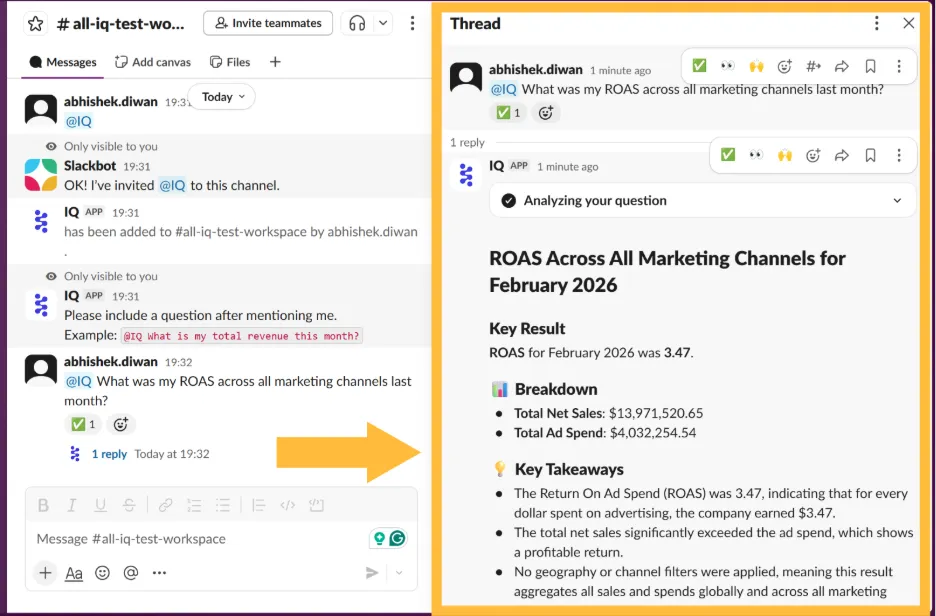
Growth and Retention Teams with C-Suite in the Channel Love This Because They Can Act Fast with Confidence
Different teams use it in different ways.
For retention teams. When you are planning a loyalty campaign or a re-engagement push, you need segmentation data without sharing it outside the team. IQ answers in the private channel. The conversation and the data stay in the same place.
eCommerce managers running multiple brands. Each brand has its own channel and its own audience for that data. IQ responds with data relevant to where you are asking. You do not need to set it up separately per brand.
CX and support leads. When a sensitive escalation comes in and you need to quickly check order volume or churn history before responding, you can ask @IQ in the channel where you are already working. No tab switching, no pasting.
Exec teams. The private channel where leadership reviews financials or preps for a board call can have IQ available for quick metric checks mid-conversation, without anyone leaving the thread to find an answer.
How to Set It Up
If IQ is already connected to your Slack workspace:
Full setup instructions are here: How to invite IQ to your private Slack channel
Available Across Your Org
Once IQ is in a private channel, any member of that channel can ask it questions, regardless of their access level in other systems. Add IQ to channels where everyone in the channel should have access to the same data. Per-user access control in Slack is on the roadmap.
If You Still Don't Have It
Talk to an IQ Champion or an AI expert on the Saras team.
Don't miss insights.

.svg)
.webp)
%201%20(1).svg)


%20Setup%20Guide%20for%20Ecommerce%20Finance%20Team.png)



















.webp)
.webp)
.webp)
.webp)
.webp)





.webp)



.webp)








.webp)






.png)



.webp)

.webp)